PDF Tools
Join, merge, split, compress, rotate, watermark, protect, and organize PDFs in one place.
 padi.audhighasu.com
PDF Analysis & Document Intelligence
Free desktop tools to edit, convert, OCR, and understand PDFs — offline-first, on Windows and Linux. No subscription.
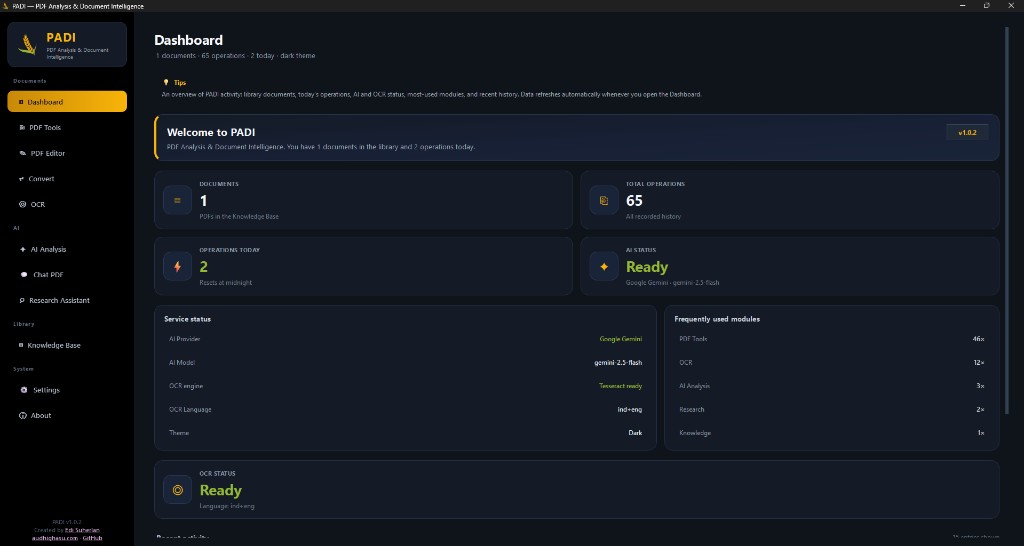
A calm dashboard for documents, OCR, AI status, and your personal knowledge library — free for everyday use.
v1.1.0 — Documents · AI · Knowledge Base · Settings
Core PDF tools are free to use and run on your machine. AI is optional when you want deeper insight.
Join, merge, split, compress, rotate, watermark, protect, and organize PDFs in one place.
Edit text, annotate, stamp, sign, and manage pages offline — including OCR for scans.
Convert PDF to editable Word (.docx), images, text, Markdown, CSV, or Excel — with a live file preview. Read scans and build searchable PDFs.
Summarize, chat with PDFs, explore research gaps, and grow a personal knowledge library.
Download free for Windows or Linux — install like a normal app, or run a portable AppImage.
Setup installer with Program Files install, Start Menu shortcuts, and uninstall from Settings → Apps.
Get Setup.exeMark the AppImage executable and launch — no system Python required.
chmod +x PADI-1.1.0-x86_64.AppImage && ./PADI-1.1.0-x86_64.AppImage
Get AppImage
Minimum specs to run PADI, and recommended specs for smooth PDF tools, OCR, convert, and preview.
Enough to open and use core PDF tools
Best for OCR, large PDFs, convert, and preview
Optional local AI (Ollama): plan for 8–16 GB RAM depending on model size. Cloud AI only needs internet and an API key. Optional helpers: Tesseract for OCR languages, LibreOffice for Office → PDF.
A clear path for everyday document tasks — free, local, and yours to keep.
Drop a PDF or pick a file. Preview pages and choose the module you need.
Compress, convert, OCR, annotate, or ask AI for a summary when connected.
Results land in your exports folder. Updates arrive via in-app release checks.
Make managing your PDF documents easier. Free to use, offline when you need it, no paywall.